
Hosting a Local LLM on a Single 5090: What We Run, and Why
A local LLM is not a cheaper cloud. It is a different product: fixed cost, fixed ceiling, full control. In this article we describe the rig we actually run: a single RTX 5090 in a Proxmox VM, serving a 27B multimodal model with a 128K-token context for agent and chat work. We will walk through what fits in 32GB of VRAM, the one knob that makes long context possible on a card this size, the serving-stack options and why we picked llama.cpp, and the operational tradeoffs that no demo shows you.
When a Local LLM Makes Sense
Three drivers push a business toward a local model.
- Data that cannot leave the network. This is the main driver in our client work. When the documents are confidential, the question is not “can we use an API” but “can we legally send this data there.” A local model removes the question.
- Cost at sustained volume. Hardware is a fixed cost; API pricing is per token. If you run agents around the clock, the break-even point arrives, and after it the local rig gets cheaper the more you use it.
- Control. No API dependency, works offline, and latency you can tune. For some workloads that is worth more than the raw quality difference.
It does not make sense when: your volume is low (the API is cheaper), you need frontier quality for the hardest reasoning, or nobody in the organization is willing to own the operations. A local model is a system, not a subscription.
This article covers the single-node case: one strong GPU, a few concurrent users. Multi-GPU and multi-node setups are a different project.
The Hardware: What 32GB of VRAM Actually Buys
The rig: an RTX 5090 (32GB GDDR7, 1792 GB/s bandwidth), 128GB of system RAM, on a Proxmox host.
The core idea: for inference, VRAM is the budget. System RAM is for everything else: the automation services, the sync database, the machine learning jobs that share the box. A common mistake is to budget for RAM and then discover the model does not fit on the card.
Here is the actual memory budget, from the server’s own log at startup, for our 27B model at 128K context:
- Model weights (Qwen3.8-27B at Q6_K): 19,960 MiB, about 19.5 GiB
- KV cache (128K context, Q8_0): 6,147 MiB, about 6 GiB
- Compute buffers: 720 MiB
- Total: 26,827 MiB of the card’s 32,110 MiB; the server projects 27,535 MiB in use and leaves 2,269 MiB free
Why Q6_K? We worked down from Q8_0. At Q8_0 the weights alone take roughly 25.5 GiB. That fits on the card, but it leaves about 6 GiB of headroom, and a 128K KV cache in the default format would need roughly 12 GiB. Q6_K was the first quantization that fit the model and the context we wanted.
The War Story: Fitting 128K Context on a 32GB Card
This is the part that took the most iteration, and the part most write-ups skip.
The KV cache, the per-token attention state the model builds as it reads a conversation, grows linearly with context length. After the weights, it is the dominant memory consumer, and at 128K tokens it dwarfs everything else.
Here is the arithmetic that made our setup possible, straight from the numbers above. The KV cache at 128K tokens in Q8_0 takes 6,147 MiB. In the default f16 format, the same cache would take roughly double: about 12,294 MiB. Add the weights and compute buffers:
19,960 + 12,294 + 720 = 32,974 MiB, against 32,110 MiB of VRAM.
It does not fit. On this card, 128K context is impossible without KV-cache quantization. The fix is three flags:
--cache-type-k q8_0 --cache-type-v q8_0 --flash-attn on
Two of them do the work; the third makes them possible.
--cache-type-k and --cache-type-v set the precision of the key and value tensors in the cache, independently. The default is f16, 16 bits per element. Q8_0 stores each element in 8 bits, so the cache is roughly half the size, and the quality loss in practice is negligible: Q8_0 is the standard “free” choice, and it is what we run. You can go lower (q5, q4) to buy even more context, but the loss starts to become measurable on long runs, and we did not need the extra room. The point is that the cache precision is a knob you control, not a fixed property of the model.
--flash-attn on is the part people miss. Flash attention is a way of computing the attention operation that keeps the intermediate math out of slow memory, and it is faster and less memory-hungry than the naive approach. With llama.cpp it is also a prerequisite: the quantized V cache is only supported when flash attention is enabled. So you cannot just quantize the cache and leave flash attention off; the two flags travel together. On a modern card it is on by default in most builds, but we set it explicitly so the intent is in the compose file.
With the three flags, the KV cache drops from about 12,294 MiB to 6,147 MiB, the whole rig fits with 2,269 MiB to spare, and the server reports n_ctx_slot = 131072. That is the entire trick: one precision change on the cache, plus the attention mode that allows it.
The honest limit: 128K is about 10% of the largest commercial context windows. In practice this has mattered less than we expected, because the agent harnesses we use (opencode, Hermes Agent) compact the context automatically, and so far we have not seen a compaction artifact we could name. The context ceiling is a real constraint; the harness manages it well enough that we have not been blocked by it.
Two more details from the log, because they matter if you copy this setup. First, the server runs n_slots = 4 with a unified KV cache: up to four concurrent sessions can share the 128K pool. We usually run one harness, occasionally two; the headroom is there for free. Second, the Qwen-VL model warns at startup that grounding (image) tasks want at least 1024 image tokens to function correctly. We run without that flag and have not hit the accuracy issue, but the warning is in the log and worth knowing about.
Choosing the Model and Quant
The model is Qwen3.8-27B, multimodal: it handles text and images, which matters for document work. We chose it for three reasons. First, instruction following and tool-calling quality: for agent work, a model that reliably emits the right tool call in the 20th step of a run is worth more than a model that is smarter on a one-shot question, because tool-calling errors compound over a long run. Second, the vision capability, so the same rig can look at scanned documents and screenshots. Third, the license: Apache 2.0, which is permissive enough for the client work we do with it.
Why not bigger? A 32B+ model at a usable quantization does not fit on 32GB with 128K of context. Why not smaller? Quality floor. A weaker model fails in the 20th step of an agent run, not the first, and by then the run is already expensive to discard.
Two flags in our setup deserve a line each. --jinja makes the server render the model’s official chat template; a malformed template is a real failure mode for tool-calling, not a cosmetic one. And the sampling settings (temperature 0.6, top-k 20, min-p 0.0) are tuned for agent and chat work, not left at defaults.
Finally, speed. The model ships with a multi-token-prediction (MTP) head, and llama.cpp can use it as a built-in draft model: the head proposes up to 2 tokens, and the full model verifies them in a single forward pass. Because the full model verifies every token, the output is identical to non-speculative generation. This is lossless, not an approximation. The cost is small (the draft context takes about 512 MiB, visible in the startup log). The payoff is real: we measured output speed roughly doubling, from around 60 to 120 tokens per second.
Choosing the Serving Stack
Four options cover most of the space:
- llama.cpp, what we run. Best quality-per-VRAM on a single node, GGUF-native, and full flag-level control. The entire 128K-on-32GB story above is impossible without it: KV-cache quantization, flash attention, and speculative decoding are all llama.cpp features. It serves an OpenAI-compatible API, so existing tools point at it with no changes. The downside is that you own the tuning.
- Ollama: zero-friction onboarding and model management. The right first step for a first local model. The abstraction hides exactly the knobs above, which is the trade you make for the simplicity. Great start; you outgrow it.
- vLLM wins on throughput. PagedAttention and continuous batching make it the right tool when many users hit the model at once. At one or two concurrent clients its advantages do not matter, and it is heavier to run. It is the choice if this became a multi-user service.
- LM Studio: GUI-first, excellent for a personal desktop on Mac or Windows. Not what you run as a headless server on a homelab VM.
The decision rule: one strong node serving a few concurrent agents calls for llama.cpp. Many concurrent users or throughput-critical workloads call for vLLM.
The Architecture: Proxmox, GPU Passthrough, Docker
The 5090 is PCI-passthrough into a Proxmox VM. Inside the VM, llama.cpp runs in a Docker container from the official server-cuda13 image, with the NVIDIA device reserved and the models on a mounted volume. The whole deployment is one compose file:
services:
  llama-server:
    image: ghcr.io/ggml-org/llama.cpp:server-cuda13
    container_name: llama-server
    restart: always
    ports:
      - "8080:8080"
    volumes:
      - /mnt/data/models:/models
    deploy:
      resources:
        reservations:
          devices:
            - driver: nvidia
              count: all
              capabilities: [gpu]
    command: >
      --model /models/Qwen3.8-27B-UD-Q6_K.gguf
      --mmproj /models/mmproj-BF16-3.8.gguf
      --host 0.0.0.0
      --port 8080
      --n-gpu-layers 99
      --ctx-size 131072
      --batch-size 512
      --n-predict -1
      --jinja
      --threads -1
      --top-k 20
      --temp 0.6
      --min-p 0.00
      --presence_penalty 0.0
      --flash-attn on
      --spec-type draft-mtp
      --spec-draft-n-max 2
      --cache-type-k q8_0
      --cache-type-v q8_0
We containerize because it is reproducible and rebuildable: the image, the flags, and the model path are the entire system, and a broken container is a one-command rebuild.
The tradeoff we have not found a way around: the LLM takes all the VRAM, so the card cannot be shared. When we need the 5090 for a large machine learning job, we stop the server and fall back to a cloud API for agent work until the card is free again. That is honest about what a single-card rig is: one workload at a time. (Automating that fallback is the subject of the observability section below.)
The same VM also runs our n8n automation stack and our Obsidian sync database. The full topology, and how the agents use this rig, is the next post in this series.
Making It Usable, and the Real Limits
Usage is unremarkable, which is the point: the server speaks the OpenAI API on port 8080, so opencode, Hermes Agent, and any other tool just point at it. We run one harness at a time, occasionally two together, and have not hit concurrency issues. The four-slot server has headroom we barely use.
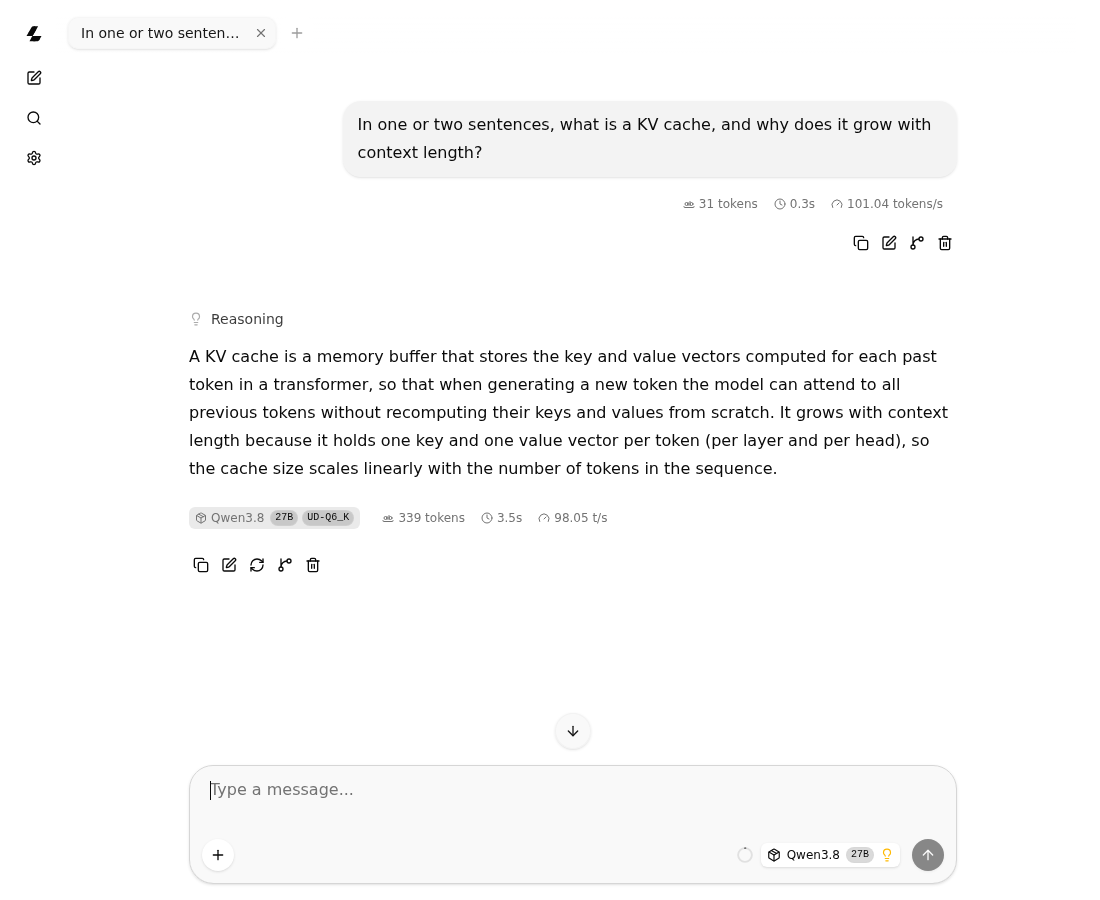
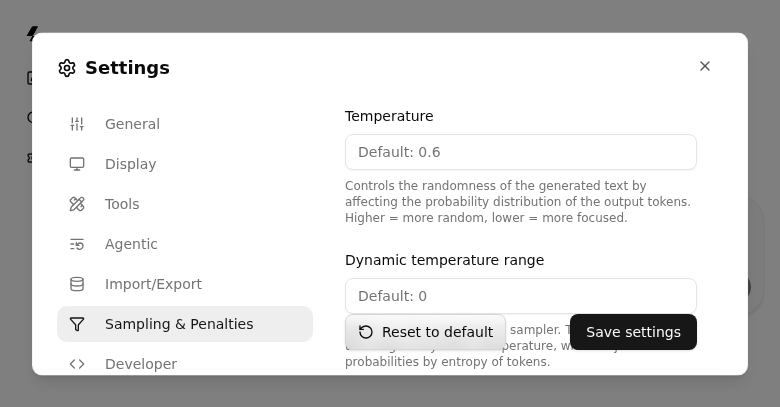
One more thing you get for free, and it is worth showing. The server ships with its own web chat interface at the same URL, so you can open the model in a browser with no extra software. It is a real chat UI: a conversation list, file and image upload (which is what the multimodal model is for), and a settings panel where you can adjust the system message, temperature, top-k, and penalties per session. The defaults mirror the server flags, so temperature shows up as 0.6, exactly as in the compose file above.
The screenshot is a real exchange with the model, not a mockup. We asked it to explain the KV cache, and it answered correctly, with the run stats right there: the model and quant (Qwen3.8, 27B, UD-Q6_K), the token count, the time, and the decode speed. That stats line is useful on its own, because it is the first place you can sanity-check that the rig is doing what you think it is doing.
We use it for quick checks and for letting clients poke at the model themselves. The agent harness is still the front door for real work, but the built-in UI is a nice free tool, and it is one of the reasons llama.cpp feels like a complete server rather than just an API.
The limits, stated plainly. Context: 128K, about 10% of the largest commercial windows, but as noted, the harnesses’ automatic compaction has so far made that ceiling a non-blocker. Concurrency: low, by design. We do not run a queue of customers; we run one or two agents doing real work. The tooling should match the load, not the other way around. And the card: fully committed, one workload at a time.
Observability: The Gap, and the Two-Step Fix
Right now our observability is docker logs. We can see that requests are happening; we cannot see token counts, costs, or trends. That is an honest gap, and the fix is two steps.
- Metrics now. Recent llama.cpp server builds expose a Prometheus
/metricsendpoint with request counts, token throughput, and queue time. Point a scraper at it and you have a Grafana dashboard for “is it busy, how fast, any errors.” Cheap, and worth doing before anything else. - A LiteLLM proxy next. Putting LiteLLM in front of the server gives per-request token and cost logging, rate limiting, and multi-provider routing with fallback, which is the part we actually want. That automates the tradeoff from the architecture section: route to the local model normally, and fall back to a cloud API automatically when the local server is stopped for an ML job. The full LiteLLM setup is its own post.
Deeper still, tracing individual agent runs, which tools fired, and tokens per step, belongs to the agents post, not this one.
Summary
Go local when data privacy or sustained volume wins, and budget the card so the weights leave room for the context you actually need. On a tight card, the one knob that unlocks long context is KV-cache quantization: Q8_0 with flash attention halved our 128K KV cache and is the difference between “fits” and “impossible.” For the serving stack, one strong node with a few concurrent agents is llama.cpp territory; many concurrent users is vLLM territory. And treat the rig as one workload at a time: plan the fallback, and put a meter on it.
This is part 1 of a series on the local AI stack we run. Next: the agent layer, how Hermes Agent and opencode use this rig, and the n8n automation around it.